Order management gets difficult when a business starts selling through more channels, fulfilling from more locations, and relying on several connected systems to complete the same customer order. A custom order management system helps coordinate those moving parts by defining how orders are validated, allocated, routed, fulfilled, updated, canceled, and returned.
A company selling through one ecommerce store and shipping from one warehouse can often manage orders with relatively simple processes. Complexity grows when the same operation adds marketplaces, B2B customers, external fulfillment partners, different service levels, and channel-specific requirements.
The problem is no longer just receiving an order. The business needs to know which system owns the order, where inventory should be allocated, what happens when fulfillment fails, and how connected platforms stay synchronized.
What Is an Order Management System?
An Order Management System, or OMS, is order management software that coordinates the order lifecycle from capture through validation, inventory allocation, fulfillment, shipment, cancellation, return, and completion. It connects sales channels with operational systems so order decisions and status updates follow a consistent process.
A marketplace order, for example, can enter the OMS, pass through validation, be allocated to a fulfillment location, move into warehouse execution, and later receive a shipment update. Several systems participate in the process, but the OMS keeps those events connected to the same customer order.
What Makes a Custom OMS Different?
Standard OMS software works well when orders follow predictable workflows. Customization becomes useful when the business has rules that packaged software cannot represent cleanly.
A distributor receives a B2B order for 120 units. Warehouse A has 70 available, Warehouse B has 40, and a 3PL location holds the remaining stock.
The system now has to choose between splitting the order, waiting for replenishment, shipping a partial quantity, or placing the remaining units on backorder. Customer terms can change the answer. One account accepts split shipments, while another requires the full quantity to ship together.
A standard "nearest warehouse" rule is not enough in that situation. The order decision depends on allocation policy, customer commitments, fulfillment availability, and the rules governing partial shipment.
A custom OMS brings those decisions into the system instead of leaving them in spreadsheets, email threads, or employee instructions.
How Does an Order Move Through an OMS?
Order Capture and Validation
Orders can enter through ecommerce stores, marketplaces, B2B systems, retail channels, EDI connections, or internal applications.
The OMS brings incoming orders into a consistent structure. Validation checks the information required before processing continues, including customer details, payment status, product availability, and fulfillment restrictions.
A wholesale order might require credit approval before inventory is reserved. A paid ecommerce order can move directly into allocation. Both orders eventually reach fulfillment, but the rules leading there are different.
Inventory Allocation and Fulfillment

Allocation determines which inventory should be committed to an order. The physical inventory record can live in a warehouse system, ERP platform, or fulfillment application, but the OMS needs trusted availability data before it makes the allocation decision.
The boundary between OMS and WMS matters here. A Warehouse Management System manages warehouse execution such as receiving, putaway, picking, packing, replenishment, and inventory movement. The OMS determines how the order should progress before and around that execution.
Routing rules then determine the priority. One operation favors delivery speed. Another prioritizes fulfillment cost, available inventory, customer commitments, or warehouse capacity.
Status Updates and Exceptions
As fulfillment progresses, downstream systems return events such as inventory reserved, order released, shipment created, tracking assigned, or shipment confirmed.
Those events need to reach the relevant sales and customer-facing systems. Without clear synchronization rules, one platform can show an order as shipped while another still shows it as processing.
The harder problems begin when the order leaves the expected path.
A customer requests cancellation after the warehouse has already received the order. If picking has not started, the fulfillment request can be canceled and inventory released. If the order is already packed, the next action could involve shipment interception or a return workflow.
The correct response depends on the order state. Treating every cancellation request the same creates inventory, fulfillment, or customer-service errors.
Similar problems occur with partial fulfillment, rejected warehouse requests, delayed inventory, duplicate integration messages, failed payments, and returns. A well-designed OMS turns recurring exceptions into defined system behavior rather than forcing employees to make the same manual decision repeatedly.
Which Capabilities Matter Most in a Custom OMS?
A custom OMS usually becomes valuable in five areas:
- Centralized visibility for multi-channel and omnichannel order management across B2B, ecommerce, marketplace, and other order sources
- Inventory allocation and fulfillment-routing rules
- Split orders, backorders, and partial fulfillment
- Custom order states and exception workflows
- Role-based approvals, overrides, and audit history
The feature list matters less than whether those capabilities reflect the real order process. Adding functions that simply duplicate the ERP or WMS creates another system to synchronize and maintain.
How Does an OMS Connect With the Rest of the Technology Stack?
OMS integration connects order decisions with the applications responsible for selling, fulfilling, shipping, and recording the transaction. Reliable data exchange keeps those systems aligned as the order moves through its lifecycle.

Sales Channels
For ecommerce order management, commerce platforms and marketplaces send orders into the OMS and receive confirmations, cancellations, fulfillment status, tracking information, and other order updates. B2B systems can follow the same central order flow while applying their own business rules.
A marketplace order is allocated successfully, but the warehouse later reports that one item is unavailable. The OMS has to change the order state, determine whether another location can fulfill the item, and return the correct status to the marketplace.
If ownership of those events is unclear, the marketplace, OMS, and warehouse can each show a different version of the same order.
ERP and Enterprise Data
In many enterprise architectures, the ERP owns customer, product, financial, procurement, and invoicing records, while the OMS manages order-routing and fulfillment decisions.
The two systems should exchange the information required to support those responsibilities rather than duplicating entire business processes in both platforms.
Warehouse and Fulfillment Systems
The OMS decides what should happen to an order and which fulfillment location should handle it. The WMS or fulfillment platform manages the operational work required to complete that request.
A 3PL platform, for example, can receive the fulfillment request, execute warehouse work, and return shipment and inventory events without becoming the system that owns the complete customer order.
For 3PLs, order management and warehouse work often need to live in one place. That's why we built Fulfillor, a combined WMS and OMS for 3PL operations, where orders from many clients flow straight into warehouse execution.
APIs and EDI
Integration methods depend on the systems and trading relationships involved. Modern applications commonly expose APIs, while established B2B networks often exchange structured business documents through EDI.
The EDI vs API integration guide explains how these approaches differ and where each fits within enterprise system integrations.
OMS vs ERP vs WMS vs TMS
These systems overlap in some products, but the clearest way to separate them is by the decision each system should own.
| System | Primary Responsibility | Typical Decision |
|---|---|---|
| OMS | Order coordination | What should happen to this order, and where should it be fulfilled? |
| ERP | Enterprise records and transactions | What customer, financial, procurement, or accounting records should change? |
| WMS | Warehouse execution | What inventory should be picked, packed, moved, or replenished? |
| TMS | Transportation execution | How should the shipment move, and which carrier or service should handle it? |
In enterprise implementations, feature overlap matters less than ownership. NOI Technologies approaches these architectures by identifying which application should own each business decision and data record before defining integrations. Clear ownership reduces duplicated logic between OMS, ERP, WMS, and other connected systems.
Custom OMS vs Off-the-Shelf OMS
A custom OMS is not automatically the better option. Packaged software is usually more practical when the existing workflows fit the platform without extensive workarounds.
| Decision Area | Off-the-Shelf OMS Fits Better When | Customization Becomes Relevant When |
|---|---|---|
| Order workflow | Most orders follow standard states and approvals | Customer, channel, or product rules change the workflow |
| Allocation | Basic inventory and location rules are sufficient | Allocation depends on service level, contracts, capacity, priority, or other business rules |
| Routing | Standard location selection covers fulfillment needs | Orders require multi-location or partner-specific routing logic |
| Exception handling | Standard cancellation, return, and recovery paths are sufficient | Recovery rules change according to order state, customer, or channel |
| Integrations | Existing connectors cover the required systems | Legacy systems, EDI, specialized APIs, or partner-specific flows are involved |
The decision should be based on the amount of operational complexity the software must represent, not on the assumption that custom development is inherently more capable.
When Does Customization Actually Make Sense?
High order volume alone is not a strong reason to build custom software. Complexity is the better signal.
A custom approach becomes more relevant when:
- Different customer groups or sales channels require different order workflows.
- Inventory allocation depends on rules that packaged software cannot model cleanly.
- Orders move across several fulfillment locations or partners.
- B2B and B2C processes share inventory but follow different approval or fulfillment logic.
- ERP, WMS, ecommerce, and fulfillment systems disagree about which application owns order decisions.
One warning sign is particularly easy to recognize: employees maintain a parallel spreadsheet because the system cannot represent the real workflow.
What Does a Practical OMS Architecture Look Like?
A common architecture places the OMS between the channels where demand originates and the operational systems responsible for execution.
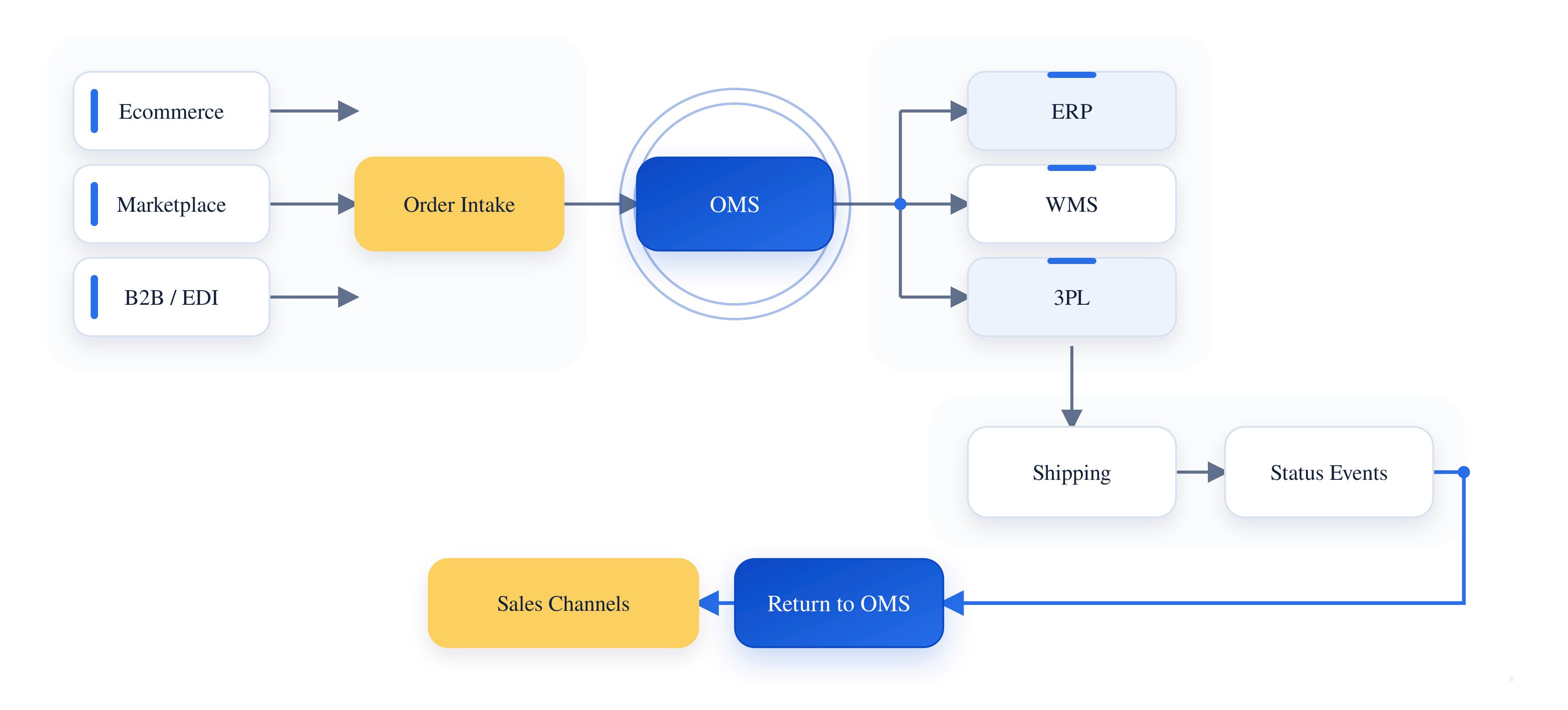
An ecommerce marketplace sends an order into the OMS. The OMS validates it and selects a fulfillment location. The WMS receives the release, executes picking and packing, and returns shipment confirmation. The OMS then updates the marketplace and ERP without requiring either system to understand the complete warehouse process.
Architecture should follow process ownership, not software labels.
How Should Businesses Plan a Custom OMS?
The technology stack should come after the order process is understood. Many OMS problems begin with unclear ownership rather than missing features.
Map the Real Order Lifecycle
Document what happens from order creation through completion, including failed and unusual paths.
Include rejected orders, late cancellations, partial inventory, duplicate messages, returns, integration outages, and manual overrides. The ideal workflow is rarely the part that causes the most trouble in production.
Start With the Highest-Friction Workflows
Customization should start where the current process creates the most manual work, operational risk, or repeated exceptions. Common priorities include allocation rules, routing logic, order states, approval workflows, exception handling, and integrations with ERP, WMS, ecommerce, and fulfillment systems.
Trying to customize every part of order management at once adds unnecessary scope. Fix the workflows creating measurable operational problems first, then expand as requirements become clearer.
Define the System of Record
Decide which application owns orders, products, customers, pricing, inventory, payments, shipments, and invoices.
If two applications both believe they own the same order status, integration logic quickly becomes difficult to maintain.
Make Allocation Rules Explicit
Requirements such as "use the best warehouse" sound clear until they have to become software rules.
Does "best" mean the closest location, lowest fulfillment cost, highest inventory availability, fastest delivery, lowest workload, or preferred contractual partner?
The answer needs to be defined before development starts.
Design Around Business Events
Start with the events that matter instead of beginning with a list of APIs.
Order created, payment approved, inventory reserved, fulfillment released, shipment confirmed, cancellation requested, return received, and refund completed are examples of events that can define integration behavior.
Plan Ownership, Permissions, and Auditability
Several teams can interact with the same order during its lifecycle. Roles should define who can approve, cancel, modify, release, or override different order states, and important manual changes should remain traceable.
Test the Messy Scenarios
The happy path is usually the easiest part of OMS testing.
More useful tests include a cancellation arriving after warehouse release, inventory disappearing during allocation, a duplicate shipment confirmation, a failed integration retry, or a multi-location order where one facility rejects fulfillment.
Does an OMS Always Need to Be a Separate System?
No. The answer depends on the software already in place and where order decisions belong.
Some businesses already run enterprise platforms with substantial order-management functionality. Adding another OMS in that environment can introduce duplicate order states, additional integrations, and more system ownership decisions.
Apache OFBiz brings order, inventory, ecommerce, accounting, and warehouse-related processes into the same enterprise framework. Businesses with specialized requirements can extend its existing order workflows to support custom allocation, routing, and exception-handling rules.
The Moqui Framework can support order workflows within a broader enterprise application, connecting order processing with inventory, customer records, accounting, and external systems.
In a fragmented technology stack, a dedicated OMS can instead provide a useful orchestration layer between sales and fulfillment systems.
Choosing the Right Order Management Approach
The better starting point is identifying where order decisions are made today, which systems own the underlying data, and where employees are compensating for gaps manually. Sometimes the right answer is a dedicated OMS. In other environments, extending an existing ERP, WMS, or fulfillment platform creates a cleaner solution.
NOI Technologies works with enterprise systems where order, inventory, fulfillment, ERP, warehouse, and integration workflows need clear system ownership. Mapping those responsibilities first helps determine whether the right solution is configuration, extension, integration, or custom development.