
Picture an Ohio distribution center at 4 p.m. The warehouse supervisor sees 480 units of FILTER-20 on hand. Finance sees 500 in the enterprise resource planning (ERP) system. A shipment for 20 units went out at 3:42 p.m., and the supervisor has the shipment number: SHP-1042. Finance pulls up the sales order and looks for a matching inventory posting. There isn't one.
That's where ERP and WMS inventory reconciliation starts. The records already give the two teams a place to look. They need to find out what happened to SHP-1042 before anyone books an adjustment for the 20 units.
What is ERP and WMS inventory reconciliation?
ERP and WMS inventory reconciliation is the process of comparing the stock recorded in the ERP and the warehouse management system (WMS) for the same item, location, and point in time. If the quantities differ, follow the underlying receipts, shipments, or other stock movements until you find the one that explains the gap. After correcting it, run the comparison again.
The ERP and WMS inventory sync moves updates between systems. Reconciliation tells you whether those updates made it into the inventory records as expected. If you're still deciding which system should send each update, see the ERP and WMS integration guide.
Why do the ERP and WMS show different inventory quantities?
Some inventory discrepancies between ERP and WMS start with the reports themselves. Say the ERP shows 100 units on hand and the WMS shows 60 available to pick. Thirty are reserved for orders, and ten are on quality hold. The warehouse still has all 100 units. Pull the WMS on-hand report and the 40-unit gap disappears.
The unit of measure is worth a look too. Once you've matched the item codes, convert both quantities to the same unit. If one report shows ten cases of 12, enter 120 individual units in the comparison. For a 3PL, match the client account as well as the SKU and warehouse. Two clients may use the same SKU code, and the building name in the WMS may differ from its location code in the ERP.
Check what each report does with damaged, reserved, held, and in-transit stock. If the ERP reports one balance for a facility, add up the WMS bins that belong to that facility. When both systems track lots, compare the lot balances too.
Then look at the timestamps. A 4 p.m. report in Ohio should line up with a 1 p.m. Pacific report. In UTC, that's 8 p.m. during daylight saving time or 9 p.m. during standard time. If both teams export at 4 p.m. local time from systems set to different zones, they'll include different movements.
How do you reconcile inventory between ERP and WMS?
Find the most recent time the balances agreed and pull the stock movements from then through the cutoff. At the Ohio warehouse, that gives the team a short list to work from. If your list is longer, the direction of the difference helps you decide where to start.
1. Use the direction of the difference to narrow the search
The ERP is higher by 20 in our example. A shipment or write-off that the WMS recorded and the ERP missed would explain that. So would a receipt posted twice in the ERP. If the ERP is lower, look first for a missed receipt or an extra deduction. When several movements add up to the gap, keep each transaction reference so the two teams can check them individually.
2. Follow the transaction through both systems
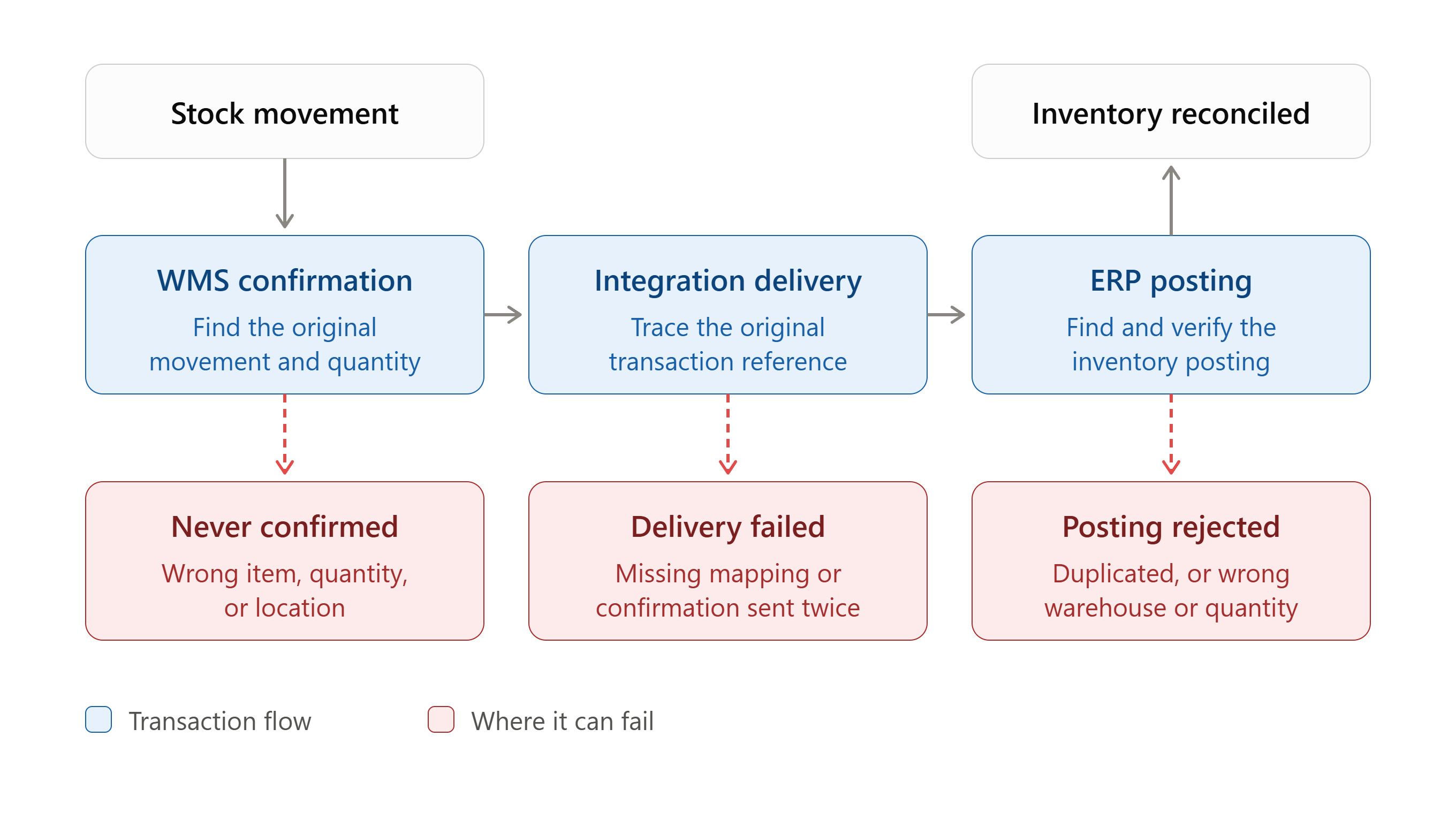
Open SHP-1042 in the WMS and check what the warehouse confirmed. Search for that same reference in the integration log, then look for the corresponding ERP inventory posting. A message may have reached the ERP and still failed validation. If you do find a posting, compare its warehouse, unit of measure, and quantity with the shipment record. The reference is worth saving alongside your findings.
When we built a Moqui-based ERP and WMS for Fulfillment Plus NY, we gave the back-office team access to order, inventory, and warehouse activity records in the same system.
3. Fix the cause before adjusting stock
A transaction that's still within its normal posting window may need a little time. If the ERP rejected it, fix the error and check for an existing posting before you retry the original message. If it already posted twice, send the duplicate posting reference to the ERP inventory owner for reversal.

If you're also unsure how many units are physically there, have warehouse staff check the bins and recent movements before approving an adjustment. Record the reason for the correction alongside the source reference and the ERP posting reference. If stock moves while you're investigating, pull fresh balances using a new shared cutoff.
How does a missing shipment confirmation affect inventory?
When the WMS deducts a shipment and the ERP misses the posting, the ERP still counts stock that has left the building. Here's how SHP-1042 looked at the Ohio distributor, using on-hand balances in individual units and a 4 p.m. Eastern cutoff.
| Record | WMS | ERP |
|---|---|---|
| Opening on-hand balance | 500 units | 500 units |
| Shipment SHP-1042 | 20 units deducted | No inventory posting |
| On hand at 4 p.m. | 480 units | 500 units |
The clue was in the integration log. The ERP had rejected SHP-1042 because the WMS facility code didn't map to an ERP warehouse. The integration owner fixed the mapping and confirmed the original shipment hadn't already posted. After the retry, the ERP recorded one deduction of 20 units. With no other stock movements, both reports showed 480.
Imagine someone had adjusted the ERP down to 480 while the shipment was still waiting to post. As soon as the original confirmation went through, the ERP would have dropped to 460. The warehouse would still show 480, and finance would have to unwind the extra deduction.
In a U.S. 3PL using X12 electronic data interchange (EDI), the 940 Warehouse Shipping Order tells the warehouse what to ship. The 945 Warehouse Shipping Advice reports what shipped. If SHP-1042 came back as a 945, the same numbers would apply: 500 if the shipment failed to post, 480 if it posted once, and 460 if the ERP deducted it twice.
What other stock movements should you investigate?
Transfers. Say 30 units leave Ohio for Pennsylvania on Tuesday. Ohio has shipped them, but Pennsylvania hasn't received them. Check the source shipment, in-transit balance, and destination receipt. If the WMS later shows the units received and the ERP still shows them in transit, trace the receipt posting. In X12 EDI, the 943 Warehouse Stock Transfer Shipment Advice reports the shipment and the 944 Warehouse Stock Transfer Receipt Advice reports the receipt.
Returns. A customer may already have a refund while the item is still on its way back. Once the warehouse gets it, check the return receipt and what happened after inspection. A unit on quality hold won't be available to sell yet.
Lots and serials. Two reports can both show 50 units even though one assigns them to the wrong lot. If both systems hold lot or serial records, compare those identifiers against the original movement. If only the WMS tracks them, check the identifiers there and reconcile the quantity at the level both reports share.
What should an ERP and WMS reconciliation report show?
A warehouse inventory reconciliation report needs enough detail for someone on the next shift to pick up the investigation. Record the SKU, warehouse, owner where applicable, stock status, unit of measure, and cutoff. Put both balances beside the variance, then log the source transaction, any ERP posting reference, and the error or resolution. At month-end, those details help finance work out which movements belong in the period and how they affect inventory valuation.
Download the ERP and WMS inventory reconciliation template (Excel). The FILTER-20 row already shows the +20 variance, the source shipment reference, and the mapping error.
If you're evaluating an integration with NetSuite, Microsoft Dynamics 365 Business Central, SAP Business One, Acumatica, or QuickBooks Enterprise, ask the vendor to run a few transactions with you in a test environment:
- Partial receipt. Receive 80 against a purchase order for 100. Both systems should show 80 received, and the ERP should leave 20 open on the purchase order.
- Delayed ERP posting. Let the warehouse confirm a shipment just before the cutoff and post it to the ERP afterward. Ask the vendor to show you where the pending update appears and how to verify the balances after it posts.
- Repeated confirmation. Submit the same shipment confirmation twice. Look for one ERP inventory deduction.
- Quality hold. Put 10 units on hold and pull the reports again. Check that on-hand and available quantities follow the rules you agreed on.
Write down who takes each exception before the integration goes live. Sending the shipment reference with the handoff saves the next person from digging through the whole order history.
| Exception type | Owner | Action |
|---|---|---|
| Unconfirmed movement or physical count difference | Warehouse operations | Verify the movement, location, and any scan or count records. |
| Missing, rejected, or delayed update | Integration team | Trace delivery and posting, fix the error, and check for a prior posting before retrying. |
| Duplicate ERP posting or approved stock correction | ERP inventory owner | Follow the approved reversal or adjustment process and record the resulting transaction reference. |
Where does Fulfillor fit in an ERP and WMS integration?
Fulfillor is a WMS for 3PLs that handle inventory, orders, and fulfillment across clients and locations. Its custom API integrations support syncing orders, inventory, and tracking data with other systems, including ERPs. If you're planning a connection, ask which events your ERP will receive, where each one posts, and where your team will see an update that fails.
Frequently asked questions
How is ERP and WMS inventory reconciliation different from cycle counting?
A cycle count checks what is physically in a bin against what the WMS says is there. Reconciliation compares the ERP and WMS records. If both systems agree but the picker comes up short, count the bin. If the picker shipped 20 and only one system shows the deduction, look up the shipment.
How often should you reconcile inventory between ERP and WMS?
Daily is a reasonable starting point if both systems can produce snapshots at the same cutoff. In a busy warehouse, it also helps to flag failed postings during the shift. A missing receipt could affect what you promise a customer before the daily report runs.
Should the ERP or the WMS be the system of record for inventory?
In many setups, the WMS owns bin balances, stock status, and warehouse movements. The ERP owns inventory valuation and financial postings. Write down which system owns each balance the two systems share, especially available stock and inventory in transit.
Can you fix an ERP and WMS discrepancy with a stock adjustment?
Yes, if a physical count confirms a stock difference and the adjustment is approved and documented. If the shipment or receipt is missing, late, or duplicated in the ERP, fix the posting first. Otherwise, the adjustment and the eventual posting may both change the same balance.
What causes negative inventory in the ERP but not the WMS?
If the ERP allows negative inventory, it may post a shipment before the receipt or transfer-in that supplied the stock. The WMS may already have both movements on record. Start with the posting order. If it checks out, look for a duplicate deduction, a wrong warehouse code, or an incorrect quantity conversion.
Seeing the same discrepancy every week? Talk with NOI Technologies about your ERP and WMS integration. Bring the two stock reports and one shipment or receipt reference. That's enough to start tracing where the update went wrong.