Many businesses start with proprietary ERP systems to manage finance, supply chain, inventory, sales, customer data, and daily operations in one place. Over time, however, high licensing costs, limited customization, vendor lock-in, and integration challenges can make these systems harder to scale.
Migrating to an open-source ERP gives businesses more control over workflows, data, customization, and long-term software costs. This guide explains when an open-source ERP migration makes sense, what steps to follow, and how to avoid common risks during the transition.
Migrating from a proprietary ERP system to an open-source ERP requires careful planning, data preparation, workflow mapping, testing, and user training. Without a clear migration plan, businesses may face data errors, integration issues, downtime, and poor user adoption.
When Should a Business Migrate to an Open-Source ERP?
A business should consider migrating to an open-source ERP when its current system becomes expensive to maintain, difficult to customize, limited in integrations, or unable to support growing operational needs.
Common signs include rising license costs, disconnected tools, manual reporting, limited workflow flexibility, poor data visibility, vendor lock-in, and difficulty adding new users, modules, or business locations.
For a closer look at the reasons for replacing an existing system, see our guide to leaving a legacy ERP.
Open-Source ERP Migration Checklist
Before starting the migration, businesses should prepare a clear checklist to reduce risks and avoid disruption during the transition.
- Audit the current ERP system, modules, users, workflows, and reports.
- Identify business requirements, integration needs, and customization priorities.
- Clean and organize customer, vendor, product, inventory, financial, and transaction data.
- Choose the right open-source ERP platform based on scalability, flexibility, and long-term support.
- Create a migration timeline with testing, training, fallback, and go-live plans.
- Assign internal owners for data, operations, finance, IT, and user training.
- Test workflows, reports, permissions, integrations, and data accuracy before launch.
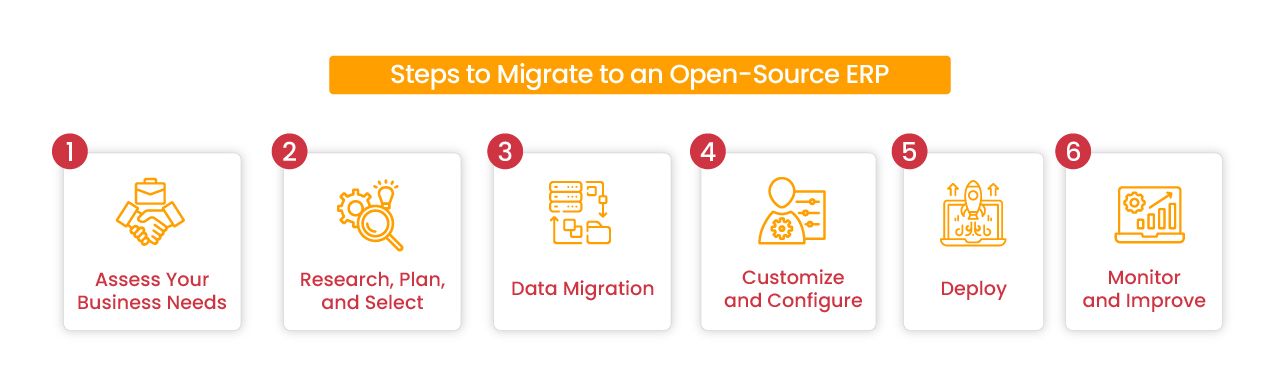
Steps to Migrate to an Open-Source ERP
Migrating from a proprietary ERP system to an open-source ERP requires more than choosing new software. A successful migration depends on clear requirements, clean data, workflow mapping, proper testing, user training, and post-launch support.
Step 1: Assess Your Current ERP Needs
Start by reviewing your current ERP system, business workflows, and operational gaps. Identify which modules and features are required, such as finance, inventory, order management, supply chain management, reporting, user permissions, and real-time visibility.
At this stage, document the pain points you want to solve, including manual processes, limited reporting, integration issues, high licensing costs, slow workflows, or lack of customization. This helps define what the new open-source ERP system must support before migration begins.
Step 2: Compare Open-Source ERP Platforms and Plan the Migration
Once the requirements are clear, compare open-source ERP platforms based on modularity, customization options, integration capabilities, scalability, community support, documentation, and long-term maintenance needs.
Apache OFBiz development includes business applications and a framework that can be adapted to project requirements. Moqui Framework provides a foundation for building enterprise applications, so assess the selected application's existing features and the development needed to meet your requirements.
Before choosing a platform, document functional gaps, configuration and development effort, integration dependencies, maintenance responsibilities, and migration scope. Use these findings to plan resources, testing, training, and cutover.
Step 3: Prepare Data and Plan Migration Tests
Identify the source data required for the new ERP, including records held in the existing ERP and connected applications. Define which records will move into the target system and which will remain in an accessible archive.
Resolve duplicates, standardize formats, and map fields and relationships to the target data model. Coordinate this work with configuration and development so test loads use the required target structures. Repeat migration tests and reconcile the results before the final production transfer during cutover.
For detailed mapping, validation, reconciliation, and cutover controls, see our ERP data migration guide.
Step 4: Customize, Configure, and Integrate the ERP
After the data structure is ready, configure the open-source ERP to match your business workflows. This may include setting up modules, roles, permissions, approval flows, reports, dashboards, tax rules, inventory rules, and department-specific processes.
Integrate the ERP with the systems your business already uses, such as ecommerce platforms, payment gateways, accounting software, warehouse systems, CRM tools, and reporting platforms. Test each integration carefully to make sure data moves correctly between systems.
Step 5: Test the ERP Before Go-Live
Before deployment, test the ERP system with real business scenarios. Check whether users can complete daily tasks, reports show accurate data, integrations sync properly, permissions work correctly, and key workflows perform as expected.
This stage should include user acceptance testing, transaction testing, reporting validation, security checks, performance testing, and backup verification. Fixing issues before go-live reduces downtime and prevents disruption after launch.
Step 6: Deploy the ERP and Train Users
Once the system is tested and approved, deploy the open-source ERP based on the migration plan. Some businesses may choose a phased rollout by department or module, while others may move all operations at once depending on complexity and risk.
Train users before and after launch so they understand how to complete their daily tasks in the new system. Clear documentation, role-based training, and internal support can reduce confusion and improve adoption.
Step 7: Monitor, Support, and Improve After Migration
After go-live, monitor system performance, data accuracy, user activity, integration health, and reporting consistency. Address post-migration issues such as bugs, missing workflows, user access problems, or additional customization needs.
ERP migration does not end at deployment. Continuous improvement helps the system stay aligned with changing business needs, new departments, higher transaction volumes, and future integration requirements.
How Long Does Open-Source ERP Migration Take?
Open-source ERP migration timelines depend on functional gaps, configuration and development work, data quality, integrations, team availability, testing, and rollout scope. A limited implementation using existing application features can differ substantially from a custom ERP build.
Estimate the timeline after requirements assessment and platform evaluation. Include time for migration rehearsals, user training, issue resolution, and cutover approval rather than treating installation as the completion date.
Discuss Your Open-Source ERP Migration
Migrating from a proprietary ERP system to an open-source ERP platform can give businesses more control over software customization, data access, integrations, and long-term operating costs. However, the success of the migration depends on proper planning, clean data, workflow mapping, testing, user training, and post-launch support.
Instead of treating ERP migration as a simple software switch, businesses should approach it as a structured transformation project. The right migration plan helps reduce downtime, avoid data errors, improve adoption, and create a system that can scale with future business needs.
NOI Technologies helps businesses assess ERP migration requirements, integrations, data risks, and custom workflows. The work begins with the existing system, the data that must move, and the processes that need to keep running through the transition.
Open-Source ERP Migration FAQs
What is open-source ERP migration?
Open-source ERP migration is the process of moving business data, workflows, modules, users, and integrations from a proprietary or legacy ERP system to an open-source ERP platform.
Is open-source ERP cheaper than proprietary ERP?
Open-source ERP can reduce license costs, but businesses should still plan for implementation, customization, hosting, support, training, and maintenance costs.
Can businesses migrate ERP in phases?
Yes. Many businesses migrate ERP in phases by department, module, location, or workflow. A phased migration can reduce risk and make testing, training, and adoption easier.