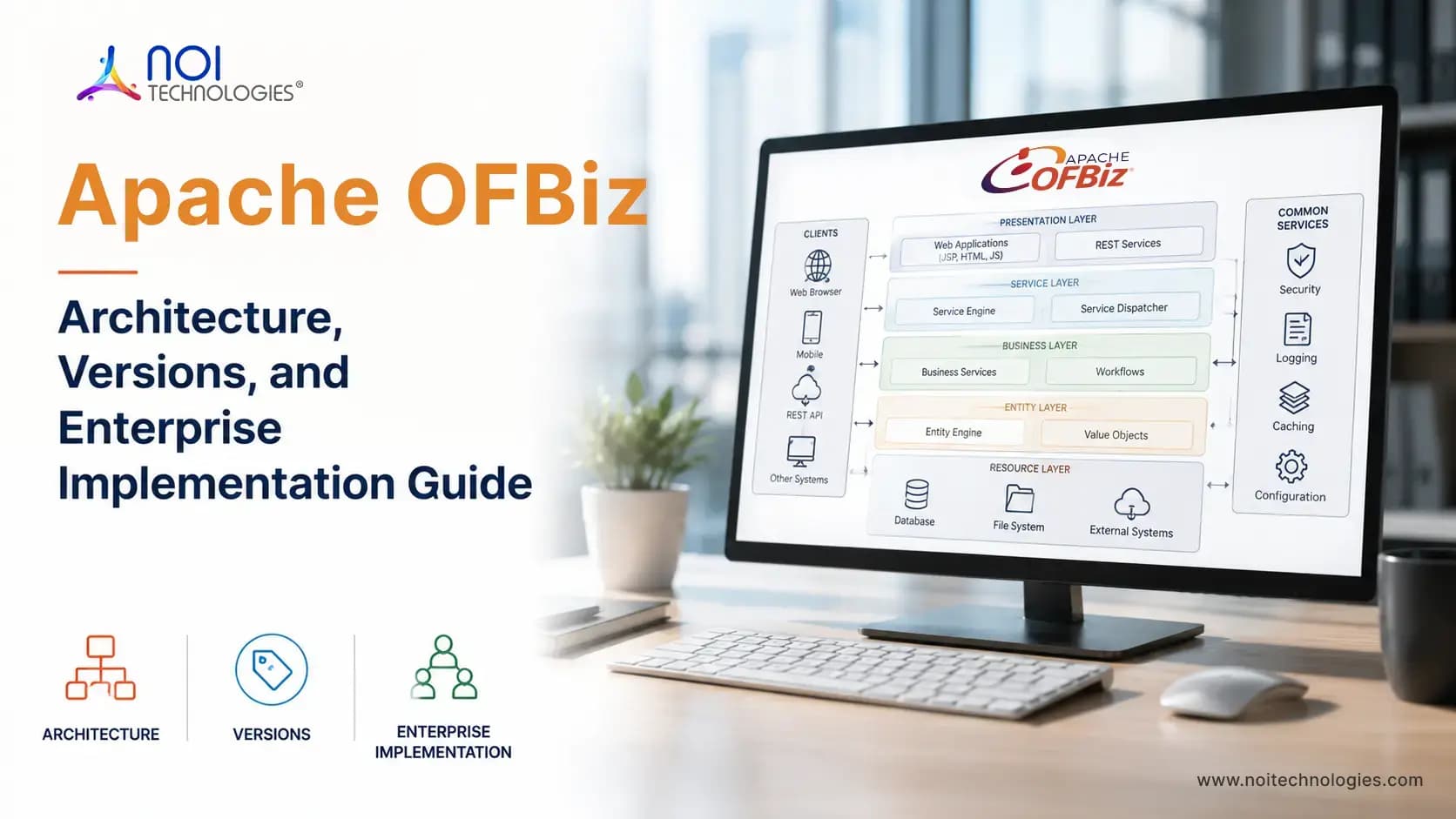
Apache OFBiz architecture combines a web MVC framework, reusable business services, a shared enterprise data model, interface tools, and component-based applications. These architectural layers provide the technical foundation for developing and extending OFBiz applications.
This guide explains the core Apache OFBiz architecture, how requests and business data move through the framework, and how developers organize services, entities, interfaces, components, and integrations. For a broader platform introduction, see our Apache OFBiz overview guide.
How Apache OFBiz Architecture Works
At a high level, OFBiz separates request routing, business logic, data access, interface rendering, and application functionality into connected framework layers. This separation allows services, entities, screens, and custom components to be reused across multiple business applications.
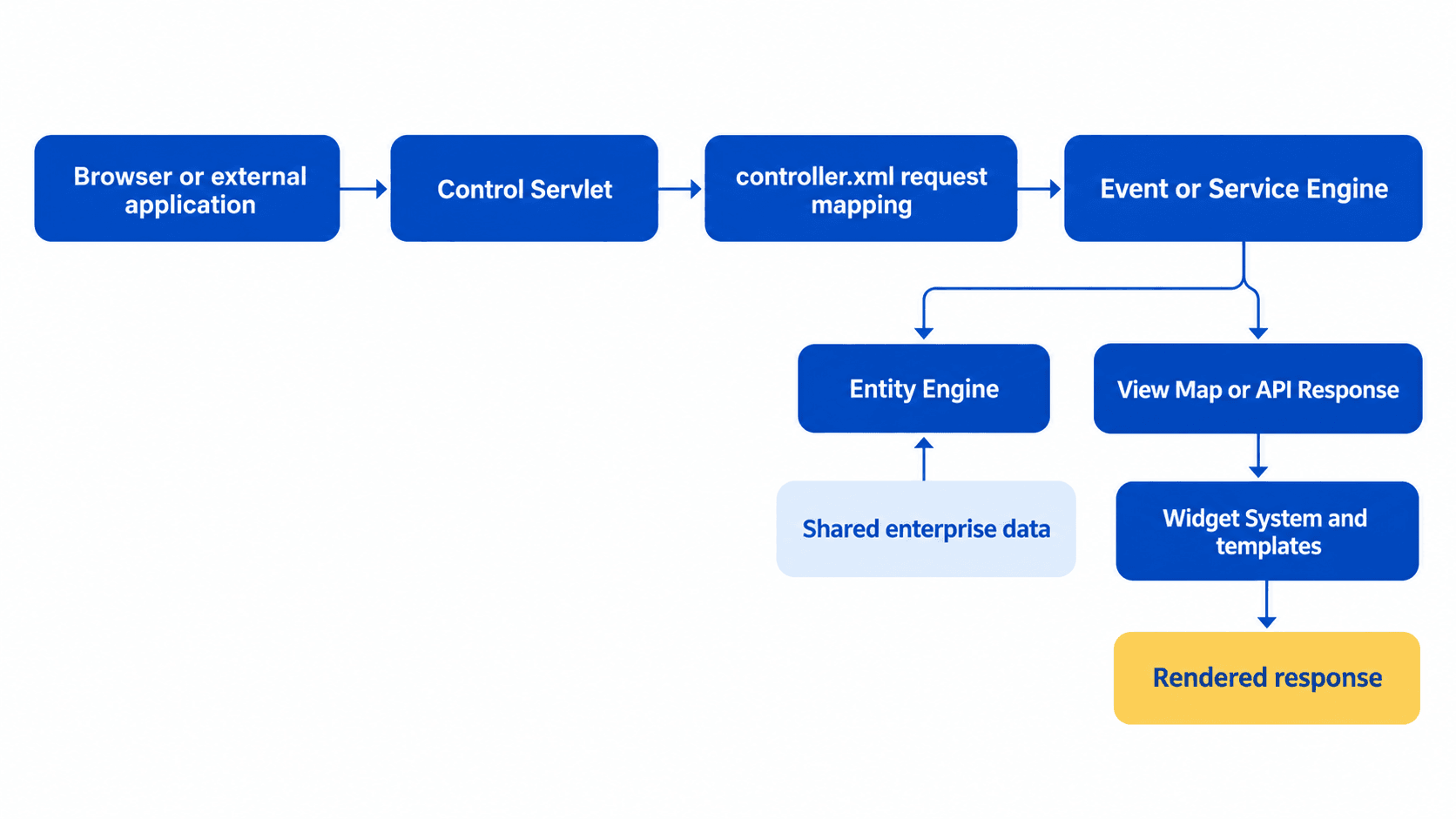
This flow is configurable. Depending on the request mapping, OFBiz may invoke an event, execute a reusable service, access enterprise data through the Entity Engine, render a widget screen, or return an integration response.
The official Apache OFBiz developer manual provides detailed technical documentation for developers working with these framework systems.
Core Layers of Apache OFBiz Architecture
The table below summarizes the main Apache OFBiz framework mechanisms and their responsibilities. These mechanisms work together through shared services, entities, and component configurations. Request handling and integration connect several parts of the architecture.
| Architecture Area | OFBiz Mechanism | Primary Responsibility |
|---|---|---|
| Request handling | Control Servlet and controller mappings | Routes requests to events, services, views, and response handlers |
| Business logic | Service Engine | Executes reusable operations, business rules, and transaction logic |
| Data access | Entity Engine | Manages entities, relationships, queries, and database persistence |
| Presentation | Widget System and templates | Renders screens, forms, menus, and application views |
| Application structure | Components and plugins | Organizes applications, services, entities, interfaces, and extensions |
| Integration | Services and integration interfaces | Connects OFBiz processes and data with external applications |
In an OFBiz development project, these architectural areas determine where changes belong. A new business record may require an entity extension, an approval rule may belong in a reusable service, and an internal workflow may need changes to screens and forms. Custom components organize those changes, while integration interfaces connect them with external systems.
How These OFBiz Systems Work Together
For a web request handled by an OFBiz application, the Control Servlet uses the component's controller configuration to map the request to an event, service, or view. An external integration may reach OFBiz through a different configured interface, so its path depends on how that integration is implemented.
Business logic can then be executed through the Service Engine, while the Entity Engine retrieves or updates enterprise data. Results may be returned through an OFBiz widget screen, API response, integration, or another application interface.
Example of an OFBiz Request Flow
Consider a request to /accounting/control/findInvoices. The web application routes it to the Control Servlet. The controller.xml request map selects the findInvoices view, which points to an OFBiz widget screen. The Widget System renders the screen and returns the response.
Flow for this example: URL → Control Servlet → controller.xml request map → View Map → Widget Screen → Response
Other request mappings may invoke an event or service before selecting a response. Those operations may use the Entity Engine to read or update data. The path depends on the request configuration and the work being performed.
How MVC Maps to the OFBiz Request Flow
In an OFBiz web application, the controller receives a request and uses controller mappings to select an event, service, and response. The view is the screen or other response rendered for the user. The model includes the business data and operations accessed through OFBiz entities and services.
MVC describes how a web request is organized. The Entity Engine, Service Engine, Widget System, and components describe the OFBiz mechanisms that support that request. They are related views of the architecture, rather than two separate systems.
Entity Engine and Shared Enterprise Data
The Entity Engine provides database abstraction and data persistence across Apache OFBiz applications. Instead of placing database-specific SQL throughout the codebase, developers define business entities for products, parties, customers, orders, inventory items, shipments, invoices, payments, and other enterprise records.
OFBiz services and applications use the Entity Engine to create, retrieve, update, and relate these records through a shared enterprise data model. This allows processes such as order management, inventory control, fulfillment, invoicing, and accounting to operate on connected business data.
Service Engine and Business Logic
The Service Engine manages reusable business logic and coordinates operations between user interfaces, integrations, and enterprise data. Services can perform validation, apply business rules, manage transactions, update records through the Entity Engine, and return structured results.
The same service can be called from an OFBiz screen, an external integration, a scheduled job, or another service. This reduces duplicated logic and helps organizations apply consistent business rules across multiple applications and channels.
OFBiz services can be invoked synchronously when the calling process requires an immediate result or asynchronously when an operation should execute independently. Services can also be scheduled for delayed or recurring execution, allowing the same business logic to support user interfaces, integrations, background processing, and other services.
Events and Services in OFBiz Request Processing
Events and services can both participate in OFBiz request processing, but they serve different architectural purposes. An event commonly handles request-level logic, such as reading parameters or controlling the immediate response. A service represents a reusable business operation that can be called from screens, other services, scheduled jobs, or integrations.
Business rules that may be needed in more than one workflow should generally remain in services instead of being tied directly to a web request. This keeps the logic reusable and prevents different interfaces or integrations from implementing the same operation differently.
Widget System and User Interfaces
The OFBiz Widget System renders native user interfaces using reusable screens, forms, menus, trees, layouts, and other interface elements. Screen definitions can prepare data, apply conditional logic, include forms and menus, and render output through templates and themes.
Organizations can use the native Widget System for administrative and internal applications or connect a separate frontend to OFBiz services and enterprise data. In this arrangement, OFBiz remains responsible for business rules and connected records while the external application manages the user experience.
Components and Plugins
Components are the primary organizational units of Apache OFBiz applications. Each component has an ofbiz-component.xml configuration file and may contain web applications, entity and service definitions, request routing, widgets, scripts, data, and tests. Optional plugins use the same component structure to add functionality alongside the standard applications.
Core OFBiz applications and optional plugins follow this component-based structure. Custom functionality can therefore be placed in dedicated components or plugins instead of being added directly to the core framework, helping reduce conflicts during maintenance and future version upgrades.
Understanding when to use a separate component or plugin is also useful when evaluating an OFBiz developer.
What Technologies Does Apache OFBiz Use?
Apache OFBiz is built on Java. Developers can implement business logic through reusable services, including services written in Java or Groovy. XML configuration is used to define many OFBiz artifacts, such as entities, services, controller mappings, and widget screens.
For its native user interface, OFBiz uses screen widgets, forms, themes, and templates. FreeMarker can be used when rendering HTML. The Entity Engine connects application data to a configured database, while Gradle supports building and running the project.
How Transactions and Permissions Cross OFBiz Layers
Authentication and authorization should not depend only on whether an action is visible in the user interface. Request mappings, services, administrative functions, scheduled processes, and integration endpoints may each require appropriate security controls. A user who cannot see an action on a screen should not be able to perform the same operation by calling the underlying request or service without authorization.
The official Apache OFBiz security page links to its permissions guidance and published advisories. For broader controls beyond OFBiz, see our open-source ERP security guide.
Transaction boundaries are equally important. A service may update an order, reserve inventory, generate an invoice, or call related services as part of one business operation. The implementation must define which changes should succeed or fail together so that a partial error does not leave connected records in an inconsistent state.
Keeping permission checks, validation, and transaction behavior close to reusable business operations helps the same rules apply whether the operation originates from an OFBiz screen, another service, a scheduled job, or an external application.
Apache OFBiz Integration Architecture
OFBiz applications may need to exchange data with ecommerce platforms, payment systems, warehouse applications, shipping providers, customer portals, reporting tools, or other enterprise systems. The integration architecture should define which system owns each record, which operations remain inside OFBiz, and how updates move between systems.
Where practical, external applications should interact with reusable OFBiz services instead of writing directly to the underlying database. Using the service layer allows OFBiz business rules, validation, permissions, and transaction behavior to remain part of the operation.
Integration planning should define:
- The source of truth for customers, products, orders, inventory, and financial records
- Whether each data exchange is synchronous, asynchronous, scheduled, or event-driven
- How external identifiers map to OFBiz entities
- How failed requests, duplicate messages, and partial updates are handled
- Which services and components own the integration logic
- How authentication, authorization, logging, and monitoring are managed
Clear integration boundaries reduce duplicated business logic and help prevent different systems from producing conflicting versions of the same enterprise data.
How REST APIs Connect to OFBiz Services
For an HTTP API integration, an endpoint receives a request, checks access, passes valid inputs to an OFBiz service, and returns a response to the calling application. The service applies the business rules and uses the Entity Engine when it needs to read or update data. This keeps API handling separate from the underlying business operation.
OFBiz offers a REST API plugin that can map defined endpoints to services. A project can also configure controller-based responses for a specific integration. The available approach depends on the OFBiz release and plugins used, so teams should verify the endpoint, authentication, permissions, input mapping, and error handling in their own application.
Planning Custom Components and Service Boundaries
Before adding custom components, review the existing applications, entities, and services that support the required operation. Identify which artifacts can be reused and where extensions are necessary.
Define which component owns each entity extension, service, screen, and integration. Document service dependencies, permission checks, and transaction boundaries so related operations behave consistently across interfaces and background jobs.
For the project delivery process, including requirements, configuration, data migration, testing, and go-live, read our Apache OFBiz implementation guide.
OFBiz Runtime and Deployment Architecture
Apache OFBiz runs as a Java application and includes Apache Tomcat as its web container. The runtime combines web applications, framework services, entity operations, scheduled processes, and plugins within the OFBiz environment.
Runtime design should account for normal workload and peak demand. Interactive requests, integration updates, scheduled services, and reports can compete for application and database resources, especially when several operations run at the same time. Daily order totals alone are not enough to determine infrastructure requirements.
Before choosing server sizes or separating workloads, test representative business operations with realistic data volumes. Review response times, database queries, background-job completion times, and integration backlogs to identify where resource limits or application behavior need attention.
Where testing identifies contention, the deployment design may need separate resources for the database, reporting, search, or background processing. Any separation must account for how jobs are scheduled, how application instances coordinate, and how data remains consistent. Keep development, testing, staging, and production environments separate so changes can be validated before release.
Keeping a Custom OFBiz Architecture Maintainable
A maintainable OFBiz architecture makes component responsibilities, service dependencies, entity extensions, and integration boundaries clear. That clarity helps teams test the system and adapt it as requirements change. For related implementation work, see how to extend OFBiz for business workflows and manage an existing OFBiz system over time.
For projects moving from an older release, see our Apache OFBiz 18.12 to 24.09 upgrade guide.
Need Help With Apache OFBiz Architecture?
NOI Technologies can review component boundaries, entity extensions, service responsibilities, integration interfaces, and deployment requirements for a new or existing application. Explore our Apache OFBiz development and consulting services for architecture assessment and custom development.
Disclaimer: The views expressed in this article are personal and do not necessarily represent the official position of the Apache Software Foundation or the Apache OFBiz project.