ERP customization allows businesses to adapt an existing enterprise resource planning system around specific workflows, reporting needs, integrations, and operational requirements.
Used carefully, customization can close important functional gaps and improve how teams use the system. Poorly planned customization, however, can increase implementation costs, complicate upgrades, create integration problems, and introduce long-term technical debt.
This guide explains the most common ERP customization challenges and outlines practical ways to control cost, complexity, maintenance risk, and system stability.
Why ERP Customization Projects Become Complex
ERP customization is the process of extending or modifying an existing ERP system when standard features and configuration options cannot fully support a business requirement.
Customization may include:
- New workflows or approval rules
- Custom reports and dashboards
- Industry-specific business logic
- User interface changes
- Third-party integrations
- Additional data fields or entities
- Custom mobile or customer-facing applications
ERP customization should not be confused with ERP configuration.
Configuration uses built-in settings, permissions, workflows, and options to change how the system behaves without modifying its underlying code.
Customization extends the system beyond its standard capabilities through code, plugins, modules, APIs, or external applications.
Configuration is generally easier to maintain and upgrade. Customization provides greater flexibility but introduces additional development, testing, documentation, and support requirements.
Customized ERP vs Custom ERP Software
A customized ERP starts with an existing ERP platform and extends it around specific business needs.
Custom ERP software is developed specifically for one organization, either from scratch or using an enterprise application framework.
A customized ERP may be appropriate when the existing platform already supports most required processes. A custom ERP may be considered when workflows are highly specialized and standard platforms would require extensive compromises.
Neither approach is automatically better. The decision should consider functional fit, implementation cost, technical resources, integration requirements, expected system lifespan, and long-term maintenance.
How Modern ERP Customization Should Be Approached
Development teams should avoid modifying the ERP core directly whenever practical.
Modern customization strategies commonly use:
- Built-in configuration tools
- Plugins and extension modules
- APIs
- Middleware
- External applications
- Low-code tools
- Event-driven integrations
This approach separates custom functionality from the main ERP application and can make upgrades, testing, and maintenance more manageable.
Direct core changes may still be required in some projects, but they should be documented carefully and justified by a clear business requirement.
Major ERP Customization Challenges and Solutions
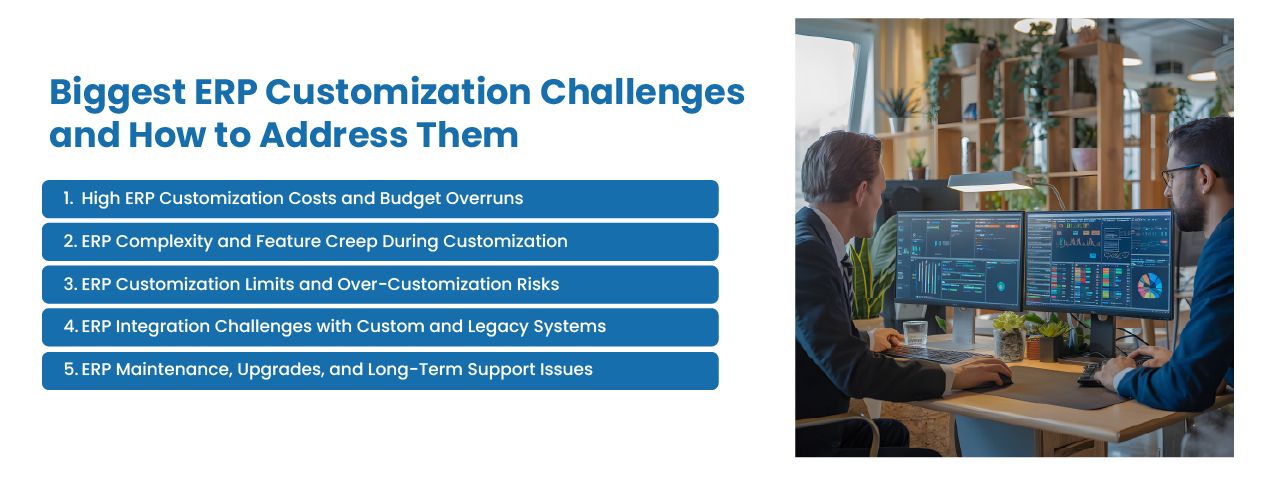
1. High Customization Costs
ERP customization can require business analysis, architecture planning, development, testing, documentation, user training, and ongoing maintenance.
Costs often increase when requirements are unclear or when teams begin development before confirming whether standard ERP functionality can meet the need.
Businesses should also account for long-term expenses such as:
- Bug fixes
- Security updates
- Upgrade testing
- Integration maintenance
- Developer support
- Infrastructure changes
How to reduce the risk:
- Prioritize requirements based on measurable business value.
- Use standard configuration before developing custom code.
- Separate essential requirements from optional improvements.
- Implement customizations in controlled phases.
- Estimate long-term maintenance costs before approval.
Teams working specifically with Apache OFBiz can use our OFBiz customization budgeting guide to evaluate delivery hours, scope boundaries, external expenses, and post-launch costs.
2. Scope Creep and Feature Expansion
Customization projects often grow as departments request additional features after development begins.
Individual requests may appear small, but together they can affect architecture, testing, cost, and delivery dates.
Uncontrolled feature expansion can also produce an ERP system that is difficult for employees to understand and maintain.
How to reduce the risk:
- Conduct a fit-gap analysis before development.
- Define the approved project scope clearly.
- Use a formal change-request process.
- Estimate the cost and timeline impact of each addition.
- Move lower-priority requests into future phases.
3. Over-Customization
Not every difference between the ERP and the current process requires custom development.
Some existing workflows may be inefficient, outdated, or based on limitations of a previous system. Reproducing every old process can transfer those problems into the new ERP.
Over-customization can result in:
- Complex user interfaces
- Duplicated functionality
- Higher maintenance effort
- Longer testing cycles
- Upgrade conflicts
- Dependence on specialized developers
How to reduce the risk:
Customize only when a requirement provides a clear operational, regulatory, or competitive benefit. Where practical, adjust the business process to use standard ERP functionality.
4. Integration with Legacy and Third-Party Systems
ERP customization often depends on integrations with ecommerce platforms, warehouse systems, CRM software, payment services, accounting tools, supplier applications, and legacy databases.
Integration problems may arise from:
- Inconsistent data formats
- Outdated APIs
- Duplicate records
- Unclear system ownership
- Poor error handling
- Different update schedules
- Weak security controls
How to reduce the risk:
- Document every system and data flow.
- Define which application owns each type of data.
- Use documented APIs or middleware where appropriate.
- Include validation, monitoring, retry handling, and alerts.
- Test integration failures as well as successful transactions.
An API-first ERP integration strategy can make connections easier to monitor and maintain than direct database integrations.
5. Upgrade and Compatibility Problems
ERP vendors and open-source communities release updates for security, performance, compatibility, and functionality.
Custom code may stop working when the underlying system changes. Deep modifications to the ERP core are particularly likely to create upgrade problems.
Teams may then need to rewrite or retest custom functionality before moving to a supported version.
How to reduce the risk:
- Avoid direct changes to core files where possible.
- Use plugins, modules, and external services.
- Document every customization and dependency.
- Maintain automated tests for critical workflows.
- Review the ERP release roadmap regularly.
- Test upgrades in a separate environment before production deployment.
6. Data Migration and Data Quality Risks
Custom ERP fields and workflows often depend on data from older systems. This data may contain duplicates, missing values, outdated records, or inconsistent formats.
Moving poor-quality data into a customized ERP can affect reports, automation, integrations, and operational decisions.
How to reduce the risk:
- Assign ownership for each dataset.
- Clean and standardize records before migration.
- Define how legacy fields map to the new system.
- Validate migrated data with business users.
- Test complete workflows using migrated records.
- Keep migration and rollback procedures documented.
7. Maintenance and Knowledge Dependency
A customized ERP may become dependent on the developers who originally created it.
If documentation is limited or the code does not follow consistent standards, future teams may struggle to fix problems or make changes safely.
This can increase costs and create operational risk when key employees or vendors are unavailable.
How to reduce the risk:
- Document architecture, code, workflows, and integrations.
- Use version control and code-review processes.
- Create technical and user documentation.
- Provide knowledge transfer to internal teams.
- Avoid relying on one developer for critical system knowledge.
8. Performance and Scalability Issues
Custom reports, integrations, background jobs, and database queries can affect ERP performance.
A customization that works with a small number of users or transactions may become slow as the business grows.
How to reduce the risk:
- Define expected user and transaction volumes.
- Test realistic peak-load scenarios.
- Review database queries and background processes.
- Monitor application and integration performance.
- Plan infrastructure capacity before usage increases.
9. Limited User Adoption
Even technically successful customizations may fail when employees find them confusing or do not understand why processes changed.
Complex screens, unnecessary fields, and inconsistent workflows can increase training requirements and encourage users to return to spreadsheets.
How to reduce the risk:
- Involve actual users during requirement gathering.
- Test prototypes with relevant departments.
- Use role-based interfaces and permissions.
- Provide practical training using realistic scenarios.
- Collect feedback after deployment.
When ERP Customization Is Worth the Investment
ERP customization may be justified when:
- The requirement supports an important business process.
- Standard configuration cannot meet the need.
- The customization provides measurable operational value.
- The workflow is required for compliance.
- The functionality creates a genuine competitive advantage.
- The business has a long-term maintenance plan.
Customization should be reconsidered when it exists mainly to preserve personal preferences, reproduce inefficient processes, or avoid minor changes in employee behavior.
ERP Customization Decision Checklist
Before approving a customization, ask:
- What business problem does it solve?
- Can the requirement be met through configuration?
- Does an existing module or integration already provide the feature?
- What is the expected business value?
- How will the customization affect upgrades?
- Who will maintain it?
- How will it be tested?
- What happens if the ERP platform changes?
- Can the customization be implemented outside the core system?
For a more structured walkthrough of these questions, see our guide to the key points for scoping customization and configuration needs.
Choosing a Sustainable ERP Customization Strategy
ERP customization should balance flexibility with long-term maintainability.
A sustainable strategy generally follows this order:
- Use standard functionality.
- Configure built-in tools and workflows.
- Evaluate supported modules or extensions.
- Use APIs and external applications.
- Develop custom code only when necessary.
This approach does not eliminate every customization risk, but it helps reduce unnecessary complexity and upgrade dependency.
Plan ERP Customization with NOI Technologies
NOI Technologies helps businesses assess which requirements need custom development and how those changes will affect integrations, upgrades, testing, and maintenance.
Explore our custom ERP development services for help planning and implementing changes around your operational requirements.
We also handle customization on open-source platforms through our Apache OFBiz customization and Moqui-based ERP development services.
Our ERP customization services include:
- Business and technical requirement analysis
- Fit-gap assessment
- Custom module development
- Workflow automation
- User interface development
- Third-party integrations
- Data migration
- Upgrade planning
- Testing and quality assurance
- Post-implementation support
Our approach prioritizes system stability, upgrade compatibility, documentation, and controlled extensibility.
Discuss Your ERP Customization Requirements
Review your ERP architecture, customization priorities, integration needs, and long-term maintenance risks with NOI Technologies.
Frequently Asked Questions
What is ERP customization?
ERP customization is the process of extending or modifying an existing ERP system to support business requirements that cannot be handled through standard features or configuration.
Why might a business need ERP customization?
A business may need customization for industry-specific workflows, specialized reports, complex approvals, unique customer requirements, or integrations with other operational systems.
What is the difference between ERP customization and configuration?
Configuration uses built-in ERP settings and tools without changing the underlying code. Customization extends the system through code, plugins, modules, APIs, or external applications.
What are common modern ERP customization approaches?
Common approaches include API-driven extensions, modular plugins, external applications, low-code tools, event-driven integrations, and configuration-first implementation strategies.
Is ERP customization expensive?
Costs depend on the complexity of the requirement, development effort, integrations, testing, documentation, and long-term maintenance. Phased implementation and configuration-first planning can help control expenses.
How can businesses reduce ERP customization risks?
Businesses can reduce risk by avoiding unnecessary core changes, documenting requirements, using modular extensions, testing upgrades, controlling scope, and assigning long-term maintenance ownership.