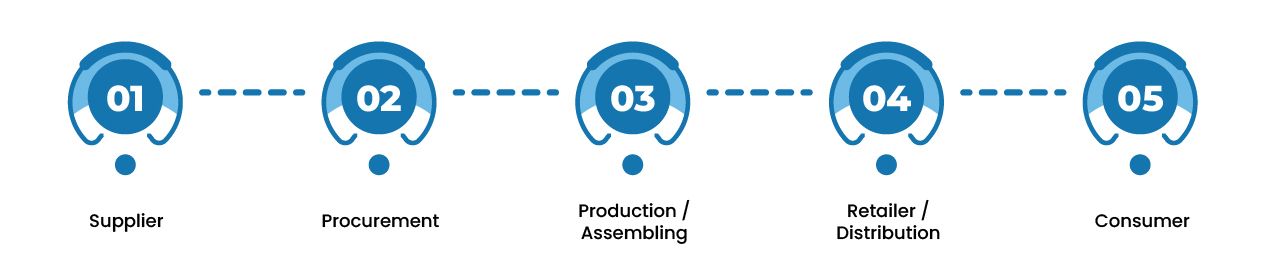
A purchase order may be approved in an ERP while receiving happens in a warehouse system and shipment updates arrive from a logistics provider. If those records do not stay aligned, purchasing, warehouse, customer service, and finance teams can act on different information.
ERP integration in supply chain management connects the records and workflows these teams depend on. Depending on the business, that may involve ERP modules and separate warehouse, manufacturing, ecommerce, or logistics systems. The benefits come from accurate data reaching the right people and systems at the right point in each process.
What Are the Benefits of ERP Integration in Supply Chain Management?
ERP integration can reduce manual handoffs, improve visibility into orders and inventory, support purchasing decisions, and help teams resolve exceptions sooner. It connects operational events, such as an approved purchase order or confirmed shipment, with the records other teams need. The results depend on data quality, integration design, and clear ownership of each update.
10 Benefits of ERP Integration in Supply Chain Management
1. Fewer Manual Handoffs Between Procurement and Finance
A purchase order, receiving confirmation, and supplier invoice describe related parts of the same transaction. When those records are connected, teams spend less time copying details between systems or searching for the document that explains a difference.
For example, finance can compare an invoice with the approved purchase order and the quantity the warehouse actually received. Procurement can see whether a discrepancy needs supplier follow-up. Integration gives both teams the relevant records, while approval rules determine who can resolve the difference.
2. Clearer Inventory and Order Visibility
Connected purchasing, order, and warehouse records help teams distinguish stock that is on hand from stock that has been ordered, reserved, received, or shipped. That distinction matters when sales teams make customer commitments or planners decide whether to replenish an item.
Visibility depends on the detail each system captures and how often it sends updates. A delayed warehouse confirmation can still leave the ERP showing an outdated quantity, so teams need to define which inventory events must be shared and how quickly.
3. Better Purchasing and Inventory Planning
Planners can make better use of open sales orders, available stock, incoming purchase orders, and supplier lead times when those records are consistent. If demand increases, they can check what is already committed and what is expected to arrive before raising another purchase request.
ERP integration supplies a more reliable starting point for that decision. Forecasting methods, reorder rules, supplier performance, and human judgment still determine what the business should buy or produce.
4. Workflows That Match Operational Requirements
Supply chain handoffs rarely follow the same rule for every product or location. A high-value purchase may need another approval. Received goods may need inspection before they become available for sale. A customer order may require a specific warehouse or shipping method.
Integrating these workflows helps teams pass both the transaction and its status to the next system. The aim is to preserve the business rule as work moves forward, so employees do not have to track approvals, holds, and exceptions in a separate spreadsheet.
5. Fewer Delays Between Order Approval and Fulfillment
Once an order is approved, its items, quantities, destination, and fulfillment instructions can move to a connected warehouse management system without manual re-entry. After picking and shipping, the warehouse can send the quantities actually shipped and the tracking details back to the ERP. For ecommerce sellers, this kind of streamlined fulfillment is one of the clearest operational benefits of ecommerce warehousing.
This reduces delays caused by copying order information between teams. It also helps the ERP represent a partial shipment correctly instead of treating the entire order as complete. Stock availability, warehouse capacity, and carrier performance still affect when the customer receives the order.
6. More Accurate Customer Updates
Customer service teams need to know more than whether an order exists. They may need to see if it is awaiting stock, being prepared in the warehouse, partly shipped, or delayed with a carrier.
When fulfillment updates reach the systems customer service uses, employees can explain the current status without asking another team to investigate every request. They can also identify which items remain open on a partial order. Integration supports clearer communication, although it cannot guarantee a delivery date.
7. Better Inventory and Cost Traceability
Connected purchasing, warehouse, and financial records make it easier to investigate how stock entered the business and why its recorded quantity or value changed. A receiving discrepancy, for example, can be reviewed against the purchase order before finance completes the related invoice workflow.
The level of traceability depends on the details captured. A business that needs to investigate lot, serial number, location, or adjustment history must make sure its warehouse processes record those details and that the relevant information is available to other systems.
8. Better Coordination When Supplier Plans Change
A supplier delay can affect more than the purchasing team. It may change a production schedule, a warehouse receiving plan, or a delivery commitment already made to a customer.
When supplier dates, incoming stock, and open demand are connected, teams can identify the affected orders and evaluate their options sooner. They may use stock from another location, contact an alternative supplier, or revise a commitment. The benefit is a shared view of the problem and its consequences, not an automatic solution to the delay.
9. Consistent Records Across Locations
Businesses operating across several warehouses or business units need shared definitions for products, order statuses, inventory adjustments, and reporting. Without them, two locations may use the same label for different events or record the same event in different ways.
ERP integration can help establish the records and update rules each location shares. That makes cross-location reporting and investigation more dependable while allowing warehouse procedures to differ where local operations require it.
10. Faster Resolution of Supply Chain Exceptions
Connected systems can make an exception visible when a purchase order is only partly received, an order is waiting for stock, or a shipment confirmation fails to reach the ERP. Teams can assign the issue to the person responsible and review the related records before the problem affects later work.
To make this benefit real, the integration must record failed updates, support appropriate retries, and prevent duplicate transactions. Teams also need a process for reconciling records that remain out of sync. Passing data between systems is only one part of resolving an exception.
How Should a Business Evaluate These Benefits?
Start with a handoff that regularly causes delays or conflicting information. Follow one transaction from beginning to end, such as a purchase order through receiving and invoice review, or a sales order through warehouse fulfillment and shipment confirmation.
Identify which system owns each record, when the next team needs an update, and what happens if that update fails. Then measure the problem before and after integration using outcomes that fit the workflow, such as time spent reconciling receipts, orders delayed by missing information, or unresolved shipment updates.
The strongest case for ERP integration is a defined operational problem with a clear way to assess improvement. NOI Technologies can help businesses review their ERP workflows, connected systems, and integration requirements before deciding what to build or change. Many of these integration patterns also reflect where current supply chain management strategy is heading.
Discuss your ERP integration requirements with NOI Technologies.