ERP implementation is more than installing new software. It is a business transformation project involving processes, data, technology, integrations, employees, and long-term system ownership.
A poorly planned implementation can result in delayed deployment, unexpected costs, unreliable data, low user adoption, and workflows that do not meet actual business requirements.
A structured ERP implementation roadmap helps organizations define responsibilities, control project scope, prepare data, test critical processes, and support employees before and after launch.
This guide explains the ERP implementation process step by step, from initial planning and software selection to go-live stabilization and continuous improvement.
What Is ERP Implementation?
ERP implementation is the process of planning, configuring, testing, deploying, and supporting an enterprise resource planning system.
The objective is to connect business functions such as:
- Finance and accounting
- Procurement
- Inventory management
- Order processing
- Manufacturing
- Warehouse operations
- Sales and customer management
- Reporting and analytics
An implementation may involve deploying a new ERP platform, replacing an outdated system, moving an existing ERP to the cloud, or modernizing selected modules and integrations.
Success should not be measured only by whether the software launches on time. The system must also support business objectives, provide reliable information, and be adopted by the employees who use it.
ERP Implementation Phases
Most ERP projects move through six broad phases:
- Discovery: Understand current processes, problems, requirements, and business objectives.
- Design: Define future workflows, system architecture, integrations, roles, and data requirements.
- Build: Configure modules, develop approved customizations, and create integrations.
- Test: Validate workflows, data, permissions, performance, and integrations.
- Deploy: Move approved data, train users, launch the system, and stabilize operations.
- Optimize: Monitor results, correct issues, and improve the system after go-live.
These phases may overlap, particularly in phased or agile implementations. However, every project should address each area before the system is considered complete.
Step-by-Step ERP Implementation Roadmap
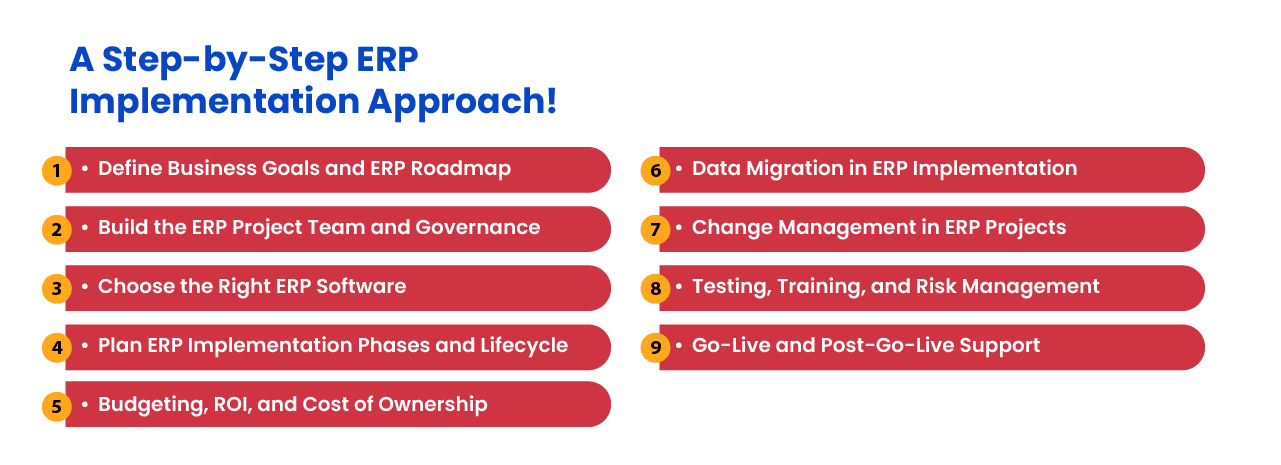
1. Define Business Goals and Success Metrics
Begin by identifying the business problems the ERP system must solve. Avoid starting with a list of software features before agreeing on the intended outcomes.
ERP objectives may include:
- Reducing order processing time
- Improving inventory accuracy
- Shortening the financial close
- Replacing manual spreadsheets
- Connecting disconnected departments
- Improving production planning
- Supporting additional locations or sales channels
- Strengthening reporting and compliance
Each objective should be connected to a measurable result. For example, “improve reporting” is vague, while “reduce monthly report preparation from five days to one day” provides a clear target.
2. Build the ERP Project Team and Governance Structure
ERP implementation should not be managed by the IT department alone. The project affects processes and responsibilities across the organization.
The implementation team may include:
- Executive sponsor
- Project manager
- Department leaders
- Process owners
- Technical and integration specialists
- Data migration leads
- Security and compliance representatives
- End-user representatives
- ERP implementation partner
Define who can approve scope changes, budgets, workflows, data decisions, and go-live readiness.
A steering committee should review progress, resolve cross-departmental issues, and prevent important decisions from remaining unresolved.
3. Document Current Processes and Requirements
Before designing the new system, document how the business currently operates.
This includes identifying:
- Current workflows
- Manual workarounds
- Data sources
- Approval requirements
- Existing integrations
- Operational bottlenecks
- Reporting requirements
- Security and compliance obligations
Not every existing process should be reproduced in the new ERP. Some workflows may exist only because the previous system was limited.
Separate requirements into essential launch requirements, desirable improvements, and features that can be introduced later. This helps control scope and prevent lower-priority requests from delaying the project.
4. Select the ERP Platform and Deployment Model
Evaluate ERP platforms against documented business requirements rather than selecting a product based on demonstrations alone.
Important selection criteria include:
- Functional fit
- Customization requirements
- Integration capabilities
- Data security
- Reporting and analytics
- Scalability
- Vendor or community support
- Implementation complexity
- Total cost of ownership
- Exit and data portability terms
Businesses should also compare cloud ERP and on-premise ERP deployment.
A cloud ERP implementation may reduce local infrastructure management and support remote access. An on-premise or privately hosted deployment may provide greater control for organizations with specialized hosting, integration, or regulatory requirements.
The correct choice depends on the business rather than a universal preference for one deployment model.
5. Create the Project Roadmap and Budget
The ERP roadmap should connect deliverables, responsibilities, dependencies, dates, and approval requirements.
Major milestones may include:
- Process discovery completed
- Solution design approved
- Configuration completed
- Integrations developed
- Data migration tested
- User acceptance testing completed
- Training delivered
- Go-live readiness approved
- Stabilization completed
The budget should account for more than software licensing.
ERP implementation costs may include:
- Software subscriptions or licenses
- Implementation services
- Custom development
- Data migration
- Integrations
- Infrastructure or hosting
- Testing
- Training
- Internal employee time
- Post-launch support
- Future maintenance and upgrades
Set aside a controlled contingency budget for identified risks. It should not become an excuse for approving poorly defined additions to the project.
6. Prepare the ERP Data Migration Strategy
Data migration should begin early rather than being treated as a final technical task.
Existing data may contain:
- Duplicate customer or supplier records
- Incomplete product information
- Inconsistent units of measurement
- Outdated accounts
- Invalid addresses
- Conflicting inventory balances
- Missing relationships between records
A data migration plan should define:
- Which records will be migrated
- Which historical data will be archived
- Who owns each dataset
- How records will be cleaned
- How old fields map to the new ERP
- How migrated data will be validated
- How failed records will be corrected
Businesses with complex reporting and integration requirements may also need stronger data engineering and analytics foundations.
7. Configure, Customize, and Integrate the ERP
Configuration should be preferred when the ERP can support a requirement through existing settings and workflows.
Custom development should be reserved for requirements that provide clear operational value and cannot be met through practical configuration.
Excessive customization can increase costs, complicate upgrades, and make the organization dependent on specialized developers.
The ERP may need to integrate with:
- Ecommerce platforms
- Customer relationship management software
- Payment services
- Shipping carriers
- Supplier systems
- Business intelligence tools
- Manufacturing equipment
- Warehouse management systems
For each integration, define system ownership, update frequency, error handling, monitoring, security, and maintenance responsibilities.
8. Test Complete Business Workflows
Testing should validate complete operational scenarios rather than isolated screens.
ERP testing may include:
- Functional testing
- Integration testing
- Data migration testing
- Security and permission testing
- Performance testing
- Regression testing
- User acceptance testing
For example, an order-to-cash test should verify the complete process from order creation and inventory allocation through fulfillment, invoicing, payment, and accounting.
Defects should be categorized by severity, assigned to an owner, corrected, and retested before go-live approval.
9. Prepare Employees Through Change Management and Training
Employees are more likely to resist an ERP implementation when they do not understand why processes are changing or how the new system affects their work.
Change management should include:
- Clear communication about project objectives
- Early involvement from process users
- Departmental champions
- Role-based training
- Updated process documentation
- Practice in realistic system scenarios
- Clear support channels
Training should reflect what each group needs to do in the system. Warehouse employees, finance teams, managers, administrators, and customer service representatives should not receive identical training.
10. Plan Go-Live and Stabilization
The go-live plan should define how the business will move from the existing system to the new ERP.
It should include:
- Final data migration
- System access preparation
- Integration activation
- Cutover responsibilities
- Go-live support contacts
- Issue prioritization
- Rollback criteria
- Business continuity procedures
Some organizations use a phased rollout by module, location, department, or business unit. Others use a single cutover when processes are too interconnected to separate safely.
The deployment approach should reflect operational risk, system dependencies, and the organization’s ability to support parallel processes.
11. Continue ERP Optimization After Go-Live
Go-live is a major milestone, but it is not the end of the ERP implementation lifecycle.
During stabilization, monitor:
- System errors
- Integration failures
- Data accuracy
- User support requests
- Process completion times
- System performance
- Adoption levels
Once critical issues are resolved, compare actual outcomes with the success metrics established at the beginning of the project.
Post-implementation improvement may include workflow refinements, additional reports, integration enhancements, user training, and carefully prioritized modules.
Common ERP Implementation Mistakes
Selecting Software Before Defining Requirements
Choosing a platform before understanding business processes often results in expensive customization or workflows that do not fit the organization.
Allowing the Project Scope to Expand Continuously
Uncontrolled additions can increase costs and delay essential functionality. Every change should be evaluated, estimated, and approved formally.
Underestimating Data Migration
Moving inaccurate or duplicate data into a new ERP transfers existing problems into a more expensive system.
Customizing Too Much
Custom development should solve meaningful business requirements. Reproducing every legacy workflow can make the new ERP as difficult to maintain as the old one.
Testing Individual Features Instead of Complete Processes
A screen may work correctly while the full business workflow fails. Testing should follow transactions across departments and integrations.
Treating Training as a Final Task
Employees need time to understand new processes, practice realistic scenarios, and provide feedback before launch.
Assuming Go-Live Means the Project Is Finished
ERP systems need monitoring, support, governance, and continuous improvement after deployment.
ERP Implementation Considerations for 2026
Businesses planning ERP projects in 2026 are increasingly evaluating cloud deployment, modular architecture, mobile access, automation, artificial intelligence, and real-time analytics.
These capabilities should be selected according to practical business requirements rather than added simply because they are current technology trends.
For example, AI-supported reporting may help users analyze operational data, but it cannot correct incomplete records or poorly designed workflows. Automation can reduce repetitive work, but an inefficient process should not be automated without first reviewing it.
The most effective ERP implementation is not the one with the largest feature list. It is the one that supports measurable business outcomes and can be maintained over time.
Need Help With Your ERP Implementation?
NOI Technologies helps businesses plan and deliver ERP projects, from requirements and data migration through testing, go-live, and post-launch support. Learn more about our ERP consulting and implementation services. For open-source projects, we also provide Apache OFBiz consulting and Moqui implementation services.
Frequently Asked Questions
How long does an ERP implementation take?
Timing depends on the platform, scope, integrations, data migration, and rollout approach. As one planning reference, our custom ERP cost guide estimates 3 to 9 months for mid-sized systems and 12 to 18 months for complex enterprise implementations. A phased rollout may put priority functions into use earlier.
What are the main phases of ERP implementation?
The main phases are discovery, solution design, configuration and development, testing, deployment, stabilization, and continuous improvement.
What is the most important step in ERP implementation?
No single step guarantees success, but clearly defined business requirements and measurable objectives provide the foundation for software selection, configuration, testing, and adoption.
Should a business choose cloud or on-premise ERP?
Cloud ERP may reduce infrastructure management and support remote access, while on-premise or privately hosted ERP may provide greater deployment control. The right choice depends on security, compliance, integration, customization, cost, and internal technical requirements.
Who should be involved in an ERP implementation?
The project should involve executive sponsors, department leaders, process owners, technical specialists, data owners, security representatives, end users, and the implementation partner.
What happens after an ERP system goes live?
After go-live, the organization should stabilize the system, resolve defects, monitor integrations and performance, support users, measure results, and prioritize future improvements.